

WPForms is a great form builder plugin for WordPress which offers a host of benefits including integration with a number of 3rd parties such as Mailchimp, PayPal, Stripe, Zapier Integration and much more.
However, like many form builder plugins for WordPress, the ajax based WPForms lacks integration with Google Analytics. While the Plus and Pro versions of WPForms may offer further functionality, the Lite and Basic seemingly fail to offer Google Analytics integration as standard. There’s no way to redirect customers to a dedicated ‘Thank You’ page nor is there any way to trigger custom code (i.e. a Google Analytics Event) upon successful form completion, therefore making it very difficult to track the volume of form completions within Google Analytics.
jQuery Event tracking Solutions for WPForms
Luckily, when a customer has successfully submitted information via WPForms they are presented with a confirmation message such as this:


This confirmation message utilities a DIV with a unique ID relating to the ID of the form:
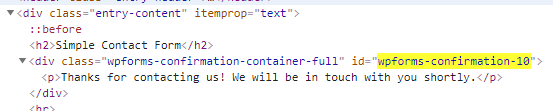

So we can use a quick jQuery script with the on document ready function to check for the existence of this ID and trigger an event within Google Analytics:
<script type="text/javascript">
jQuery(document).ready(function($){

    var $myDiv = $('#wpforms-confirmation-XXXX');

    if ( $myDiv.length){
        gtag('event', 'contact', { 'event_category' : 'Form Completion', 'event_action' : 'Submitted', 'event_label' : 'Demo Enquiry Form'})
    }
});
</script>
This code should be inserted into your footer.php file ahead of the closing tag.
Please note that the ‘XXXX’ above will relate the to unique ID of your form, therefore you’ll need to find your ID and modify the code above to suit.


Also note that the above code is configured to work with the new Global Site Tag for Google Analytics, but can easily be adapted to work with the legacy versions such as Universal Analytics (analytics.js), for example:
<script type="text/javascript">
jQuery(document).ready(function($){

    var $myDiv = $('#wpforms-confirmation-XXXX');

    if ( $myDiv.length){
        ga('send', 'event','Form Completion','Submitted','Demo Enquiry Form')
    }
});
</script>
That’s it. A quick, easy and effective jQuery solution for tracking Google Analytics events with WPForms.
Update
A few people have asked how to configure the goal within Google Analytics. I’m going to assume that you have already registerd with Google Analytic and deployed the required tracking code throughout your website. If you haven’t made it that far, I suggest you read Google’s Get started with Analytics guide before you go much further.
As for configuring the goal, assuming you have not altered the code provided above, you can simply configure the goal as follows:

