
WPForms is a great form builder plugin for WordPress which offers a host of benefits including integration with a number of 3rd parties such as Mailchimp, PayPal, Stripe, Zapier Integration and much more.
However, like many form builder plugins for WordPress, the ajax based WPForms lacks integration with Google Analytics. While the Plus and Pro versions of WPForms may offer further functionality, the Lite and Basic seemingly fail to offer Google Analytics integration as standard. There’s no way to redirect customers to a dedicated ‘Thank You’ page nor is there any way to trigger custom code (i.e. a Google Analytics Event) upon successful form completion, therefore making it very difficult to track the volume of form completions within Google Analytics.
jQuery Event tracking Solutions for WPForms
Luckily, when a customer has successfully submitted information via WPForms they are presented with a confirmation message such as this:

This confirmation message utilities a DIV with a unique ID relating to the ID of the form:
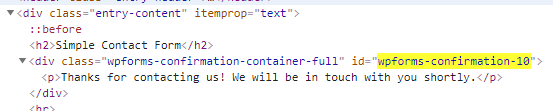
So we can use a quick jQuery script with the on document ready function to check for the existence of this ID and trigger an event within Google Analytics:
<script type="text/javascript">
jQuery(document).ready(function($){

    var $myDiv = $('#wpforms-confirmation-XXXX');

    if ( $myDiv.length){
        gtag('event', 'contact', { 'event_category' : 'Form Completion', 'event_action' : 'Submitted', 'event_label' : 'Demo Enquiry Form'})
    }
});
</script>
This code should be inserted into your footer.php file ahead of the closing tag.
Please note that the ‘XXXX’ above will relate the to unique ID of your form, therefore you’ll need to find your ID and modify the code above to suit.

Also note that the above code is configured to work with the new Global Site Tag for Google Analytics, but can easily be adapted to work with the legacy versions such as Universal Analytics (analytics.js), for example:
<script type="text/javascript">
jQuery(document).ready(function($){

    var $myDiv = $('#wpforms-confirmation-XXXX');

    if ( $myDiv.length){
        ga('send', 'event','Form Completion','Submitted','Demo Enquiry Form')
    }
});
</script>
That’s it. A quick, easy and effective jQuery solution for tracking Google Analytics events with WPForms.
Update
A few people have asked how to configure the goal within Google Analytics. I’m going to assume that you have already registerd with Google Analytic and deployed the required tracking code throughout your website. If you haven’t made it that far, I suggest you read Google’s Get started with Analytics guide before you go much further.
As for configuring the goal, assuming you have not altered the code provided above, you can simply configure the goal as follows:

“This code should be inserted into your footer.php file ahead of the closing tag.”,I have done this,but i did not know how Google analytics works?
can you explain more on this?
Also how can see the conversion on google adwords?
Hi Tim,
You will need to have configured Google Analytics for your website and deployed the “standard” tracking code ahead of deploying the solutions in this point. I suggest starting here – https://support.google.com/analytics/answer/1008015?hl=en.
As for integration with Google Adwords, there are several ways this can be done, but the easiest solution is probably to simply link Google Analytics to your Google Adwords account. Details on how to do this can be found here – https://support.google.com/analytics/answer/1033961?hl=en.
You also need to configure a “Goal” in Google Analytics based on the event data described in this post (subject to any amendments you may have made) and import this into your Adwords account. Details on this can be found here – https://support.google.com/analytics/answer/1034306?hl=en.
Let me know if you need any further support.
Cool! Quick question though, wouldn’t that get overwritten every time your theme gets updated?
Short answer, yes it would. Hopefully you’re utilising child themes to manage the customisation of your theme – if not, you should be 🙂
Hi there, I’ve done this, but I have no idea how to set up a goal with these parameters? I want to set up a goal in order to see how many people fill out the wpforms contact form. I have on my site. I also have no idea how I would know if your instructions are working. I’ve put this code within the footer.php below the but above the
Thanks so much
Hi Alee,
Setting up the goal in Google Analytics is quite straight forward, assuming you have implemented the script correctly.
That should be all you need to start tracking the volume of form submissions from WPForms in Google Analytics.
Let me know how you get on 🙂
Chris
This flat out refuses to do anything, using either the gtag or ga code. No event data received in analytics except the standard form entry and exit fields. But no events sent on confirmation, and yes I definitely have the right form ID and I’ve put the code in the correct place.
I’ve inspected the page source code and everything is appearing correctly exactly as you indicate but still no event sent to analytics the div id is in my source code and it matches exactly (apart from the # you said to add at the start) the javascript. This seems like really simple code but it flat our isn’t doing anything, and now I have wasted an hour on this already and I want to throw this machine through a window? How can this be trouble shot? I can’t seem to inspect anything through tag manager. Should I try loading this code with tag manager?
OK, well for people who are using Tag Manager, you can achieve the same thing by using “Element Visibility” as a trigger, and you need to input “wpforms-confirmation-XXXX” as your element ID, then obviously add the tag to send an event to Analytics. Hope this may be of some use to someone.
hello Adam,
I use Tag Manger as well and have some issues,
did you let the same code in the footer or just setup the trigger?
thanks
This worked perfectly for me. Thank you Chris. I used the Head, Footer and Post Injections plugin to insert the code into the section of every page (not the footer). I then set up an Event goal in Analytics that matched Category, Action and Label from the code Chris provided. After doing this you can test it is working by submitting a form and going to Analytics / Real-Time / Events. The last step is to import the Analytics goal into Google Ads to track conversions.
Currently using the free forms tab in WP. Not a specific plugin. How best can I track the form submissions without getting a new plugin that I’d have to download?
Worked for me, cheers! Used Adam Ford’s tip for setting the trigger up in GTM (his second comment where he’d resisted throwing his machine out the window). All good!
Glad to be of service Mr Shepherd! 🙂
Here’s an alternative that worked for me:
jQuery( document ).ready( function() {
jQuery( document )
.on(‘click’, ‘#wpforms-submit-xxxxx’, function() {
ga(‘send’, ‘event’,’Form Completion’,’Submitted’,’Demo Enquiry Form’);
});
});
so this alternative is tracking the event on click of the submit button
The problem with this approach James is that a click on the submit button is not indicative of successful submission. What happens if a required field is omitted so the form fails to validate? Your jQuery will trigger an event even though the form was not successfully processed. That’s why I avoid button clicks if I can.
I know this is an old article, but can you provide some guidance for using this with GTM? Any help walking through the steps to set it up in GTM & GA would be much appreciated. Thank you!
You could adapt the script to push an event to the data layer instead of pushing to directly to Google Anaytics, for example:
if ( $myDiv.length){
dataLayer.push({
‘event’: ‘Form Completion’,
‘form_name’: ‘Demo Enquiry Form’
});
}
You’d need to configure GTM to capture the event as a trigger, and capture the ‘form_name’ as a variable, but it’s definitely do-able.